
ScribMaster draw and paint2018.2 - Get APK
You'll be able to download in few seconds.
Publisher Description


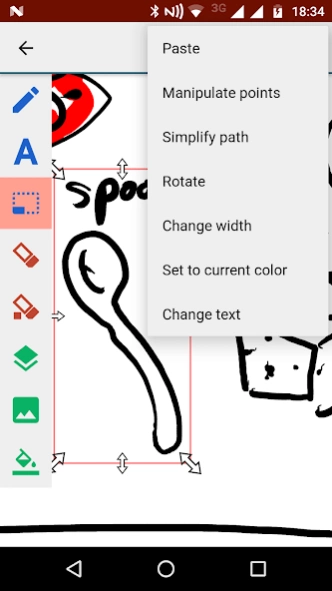
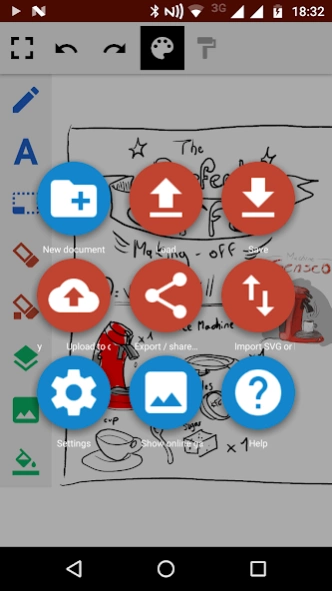
One of the most advanced vector based drawing applications for Android!
ScribMaster is a powerful vector based drawing application specifically designed for phones with large screens and tablets.
The paint engine works with scalable vectors instead of pixels, so you can zoom in and work on fine details without pixelation (the filling tool is an exception, it works with bitmaps). For vectoring we use SVG, you can export your images to your pc for professional editing in this format*. You can export PDF* files, too.
The new, revisited and intuitive user interface gives you quick access to the sketching & painting tools while it is still possible to make the interface invisible so that you can concentrate on your artwork.
If you create a ScribMaster account, you can send your artwork to other users via included instant messaging, or upload it to your online gallery (your "ImageStream").
Advanced features such as layers, transparency or the filling tool makes this application one of the most powerful of all drawing apps for Android.
*** TRY OUR NEW APP HANDWRITE, FOR HANDWRITTEN NOTE TAKING AND DRAWING! ***
*** http://play.google.com/store/apps/details?id=net.thoster.handwrite ***
(Images drawn with ScribMaster by My Art © Luciano Vivirito, http://www.oasi-blu.com/)
Features:
✓ SVG Scalable vector graphics import and export feature*! Edit your ScribMaster drawings with Inkscape (free) or Adobe Illustrator! Note: Not all features will be exported, only the default and the pressure / speed dynamic pen will work due to restrictions of the SVG format.
✓ Pen only mode (For devices with pens such as Thinkpad Tablet, Galaxy Note)
• Pressure sensitivity for pens
✓ Two finger pan & zoom navigation (multitouch)
• Very huge canvas sizes
✓ Layers
• Import images from Photo Library
• Move and scale one layer only
• Rearrange layers
• Toggle visibility
✓ Gallery
• Store your artwork in vector format on your device
• Upload your drawings to your personal online gallery ("ImageStream")
• Export your drawings and share them (as jpgs)
• Full backup*
✓ Brushes
• 3D-Effect
• Airbrush
• Art pen
• Pressure sensitive pen
✓ Tools
• Line tool
• Fill tool
✓ Instant messaging
• Share work with other ScribMaster users
• Complete history of shared images
• Receive a notification for a new image
• Receive new images on a widget
• Texting
* With premium key only
About ScribMaster draw and paint
The company that develops ScribMaster draw and paint is Alstapp Note & Draw. The latest version released by its developer is 2018.2.
To install ScribMaster draw and paint on your Android device, just click the green Continue To App button above to start the installation process. The app is listed on our website since 2018-05-22 and was downloaded 0 times. We have already checked if the download link is safe, however for your own protection we recommend that you scan the downloaded app with your antivirus. Your antivirus may detect the ScribMaster draw and paint as malware as malware if the download link to net.thoster.noteshare is broken.
How to install ScribMaster draw and paint on your Android device:
- Click on the Continue To App button on our website. This will redirect you to Google Play.
- Once the ScribMaster draw and paint is shown in the Google Play listing of your Android device, you can start its download and installation. Tap on the Install button located below the search bar and to the right of the app icon.
- A pop-up window with the permissions required by ScribMaster draw and paint will be shown. Click on Accept to continue the process.
- ScribMaster draw and paint will be downloaded onto your device, displaying a progress. Once the download completes, the installation will start and you'll get a notification after the installation is finished.
Program Details
System requirements
Download information
Pricing
Version History
version 2018.2
posted on 2018-05-22
✔ Privacy policy for account creation
✔ Small improvements
version 2018.1
posted on 2018-01-15
✔ Fixed some crashes in export modules
✔ Small improvements
version 10.4
posted on 2016-11-27
That's new in Version 10.4,✔ Improved autosave,✔ Fixed a problem while adding images using the layers dialog,That's new in V10.3:,✔ Mulitline text,✔ Fixed a possible crash on startup,That's new in V10:,✔ Object eraser,✔ Improved usability,✔ New intro screen,✔ Removed instant messaging,✔ Fewer rights needed,✔ Bugfixing, many improvements
version 6.2
posted on 2013-06-19
Several fixes and updates
Disclaimer
External Download
We do not host ScribMaster draw and paint on our servers. We did not scan it for viruses, adware, spyware or other type of malware. This app is hosted by Galad and passed their terms and conditions to be listed there. We recommend caution when installing it.
The APK Download link for ScribMaster draw and paint is provided to you by apps112.com without any warranties, representations or guarantees of any kind, so access it at your own risk.
If you have questions regarding this particular app contact the publisher directly. For questions about the functionalities of apps112.com contact us.
